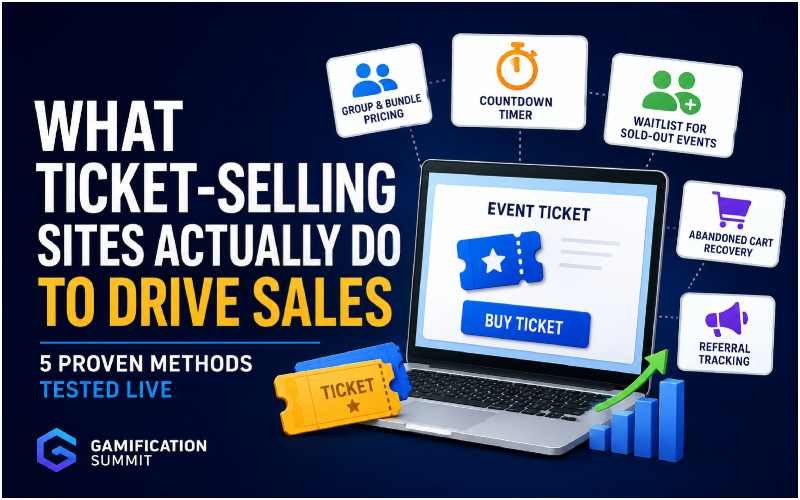
A ticket page with no urgency, no visible demand, and no easy way to buy for a group tends to underperform, even when the event itself is appealing. Most ticket-selling platforms build specific features to address exactly this, but many organizers never turn them on. The good news is that none of these fixes require custom development or extra budget. Most already exist inside the platform, sitting unused behind a single settings toggle. This guide walks through five site gamificationsummit method ticket sales tools, each tested live rather than just explained in theory, so you can see exactly what changes on the buyer’s side once they are switched on.
Quick Comparison
Before the full breakdown, here is how these five methods compare at a glance.
| Method | What It Solves | Setup Effort |
| Waitlist | Lost sales from sold-out tickets | Low, usually a toggle |
| Countdown Timer | Buyers delaying a decision | Low |
| Group and Bundle Pricing | Low average order size | Medium |
| Referral Tracking | No visibility into which channels convert | Medium |
| Abandoned Cart Recovery | Buyers who start but do not finish checkout | Medium, platform-dependent |
Waitlists for Sold-Out Events
A waitlist keeps interest alive after tickets sell out instead of just showing a dead end. This was tested using Back In Stock Notifier for WooCommerce (WooCommerce Waitlist Pro), on a test ticket set to a stock quantity of one.
After completing a test purchase (Order #604) that took the last ticket, the product page automatically switched to Out of Stock. The Add to Cart button disappeared, and a waitlist signup box took its place. Entering a test email into that box returned an immediate confirmation message.
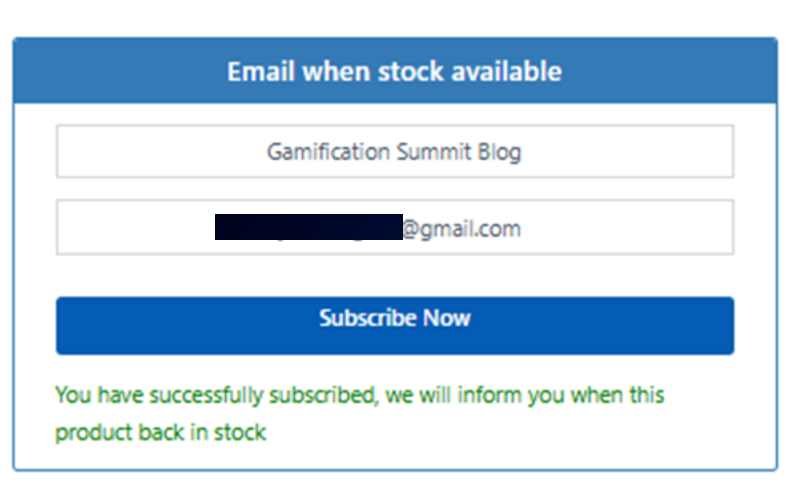
No manual step was needed to trigger any of this. Once stock hit zero, the plugin handled the switch automatically.
Group and Bundle Pricing
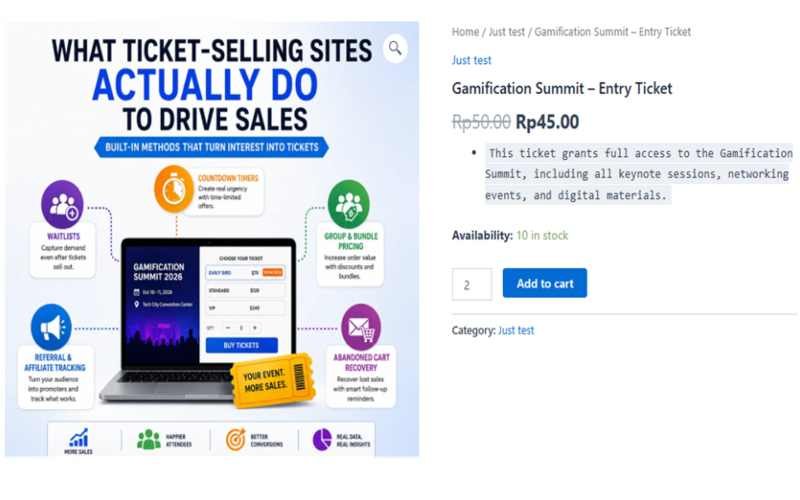
Letting a buyer purchase multiple tickets at a small discount increases the average order size without needing more individual buyers. This was tested using Discount Rules for WooCommerce, with a rule set to apply 10 percent off for a minimum quantity of two tickets.
Selecting a quantity of two on the test ticket page dropped the price automatically from Rp50.00 to Rp45.00 per ticket, with the discount applied before reaching checkout. No coupon code or manual entry was required from the buyer.
Countdown Timers and Sale Windows
A visible countdown to when early-bird pricing ends, or when a sale closes entirely, gives buyers a real reason to act now instead of later. Two approaches were tested here.
The first used WooCommerce’s own built-in sale price field, setting a sale price with a scheduled end date. This displayed a crossed-out original price next to the discounted one directly on the product page, with no extra plugin required.
The second used HurryTimer, a dedicated countdown plugin, to add a visible banner counting down to a set end date on the product page. This adds a more prominent visual cue than the built-in sale price alone.
A countdown only works if the deadline is genuine. A timer that resets or never actually expires trains buyers to ignore it.
Abandoned Cart Recovery
A buyer who starts checkout but does not finish is not automatically a lost sale. This was tested using Abandoned Cart Lite for WooCommerce, a free plugin by Tyche Softwares.
The plugin settings showed a default cutoff time of 10 minutes. This means the plugin logs a cart as abandoned when the customer does not complete the order within that time. During testing, we created a cart and entered a name and email address at checkout. Then, we closed the browser tab without placing the order. Afterward, the plugin correctly displayed the abandoned cart, including the entered email address, in its dashboard.
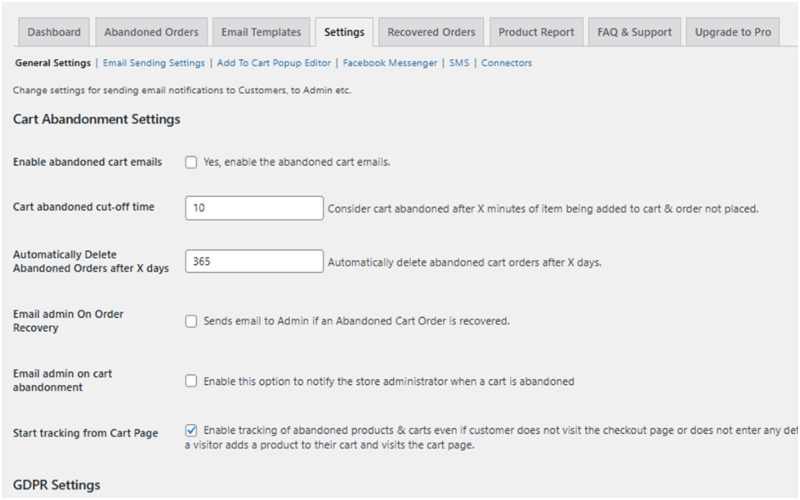
This gives a real second chance at a sale that would otherwise disappear silently.
Referral and Affiliate Tracking
Some platforms let you generate a unique link for attendees or partners to share, then track which sales came from which link. This was tested using SliceWP, a free affiliate tracking plugin, connected directly to WooCommerce.
Setup involved enabling the WooCommerce integration inside SliceWP, setting a commission rate of 10 percent, and creating a test affiliate account with its own referral link. That link was then used to complete a test purchase, to confirm the referral gets attributed correctly on the commissions side.
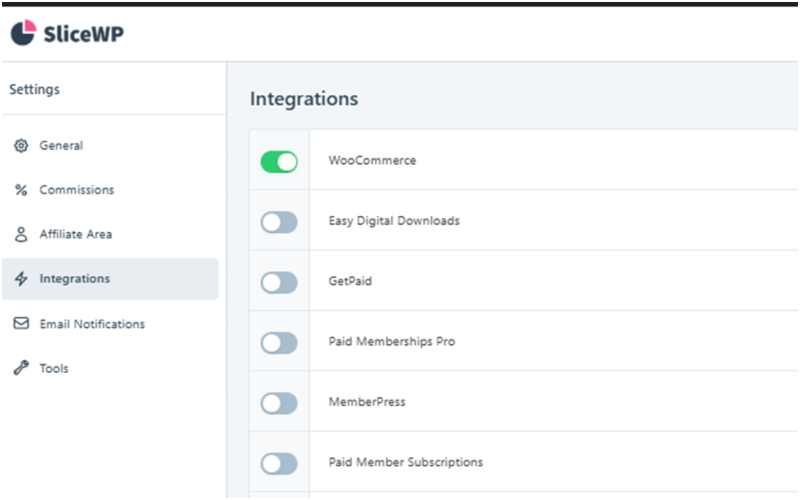
This turns an existing audience into a distribution channel, with real data on which referral sources actually convert instead of just guessing.
What This List Does Not Guarantee
None of these site gamificationsummit method ticket sales features work on their own. A waitlist does not help if there was never real demand to begin with. A countdown timer does not create urgency if the pricing behind it does not actually change. These tools amplify a sales strategy that already makes sense. They do not replace one.
For the broader strategy these tools support, see the main ticket sales strategy guide on this blog.
A Note on the Test Setup
We ran all five tests on a single WooCommerce store that we built specifically for this guide. We used free plugins that any WordPress site can access. Additionally, we set the store currency to Indonesian Rupiah during testing. Therefore, the screenshots show prices as Rp50.00 instead of dollars. However, the currency only changes how the prices appear. It does not change how any of these features work.
- Waitlist: Back In Stock Notifier for WooCommerce
- Group and Bundle Pricing: Discount Rules for WooCommerce (by Flycart)
- Countdown Timer: WooCommerce’s built-in sale price scheduling, plus HurryTimer for a visible banner
- Abandoned Cart Recovery: Abandoned Cart Lite for WooCommerce (by Tyche Softwares)
- Referral and Affiliate Tracking: SliceWP
Frequently Asked Questions
Do all ticket-selling platforms offer these features out of the box?
No. On WooCommerce specifically, all five methods here required installing a separate free plugin, except the basic sale price scheduling, which is built in. Other platforms vary, so check what is native versus what needs an add-on.
Should a small event with limited tickets bother with a waitlist?
If the event has any realistic chance of selling out, a waitlist costs nothing to enable and, based on this test, took only a few minutes to set up and start working correctly.
Is urgency messaging manipulative?
It depends on whether the urgency is real. A genuine deadline that actually applies is a normal sales practice. A fake or endlessly repeating countdown misleads buyers and tends to damage trust once noticed.
Final Thoughts
The site gamificationsummit method ticket sales tools covered here, waitlists, countdowns, group pricing, referral tracking, and cart recovery, were not just researched, they were set up and tested directly. All five worked as expected on this setup, each using a free plugin and a small amount of configuration time.
For platform recommendations to start with, see the full platform comparison guide. For payment setup specifically, the Xendit walkthrough covers a real tested integration. Questions this guide did not answer? Get in touch.
Editorial Transparency
Last updated: August 12, 2026
Basis for this article: All five methods below were personally set up and tested on a live WooCommerce test store, using real plugins, not just read about in documentation
What this article does not cover: This test used one store configuration. Results may differ slightly depending on your specific plugin choices and setup
Corrections: If anything here is inaccurate or out of date, contact us and it will be corrected
Disclaimer
This article describes results from one specific WooCommerce test setup using the plugins listed above. Other plugins, themes, or store configurations may behave differently. This is not financial or professional advice. Verify your own setup independently before relying on it for a real event.