I thought the difficult part ended when the payment screen showed “Successful.” Then one of my colleagues paid for a ticket, saw the success message, and waited for the ticket email. Another colleague later saw “Pending” and nearly tried paying again. Those incidents made me look past checkout and ask a better question:
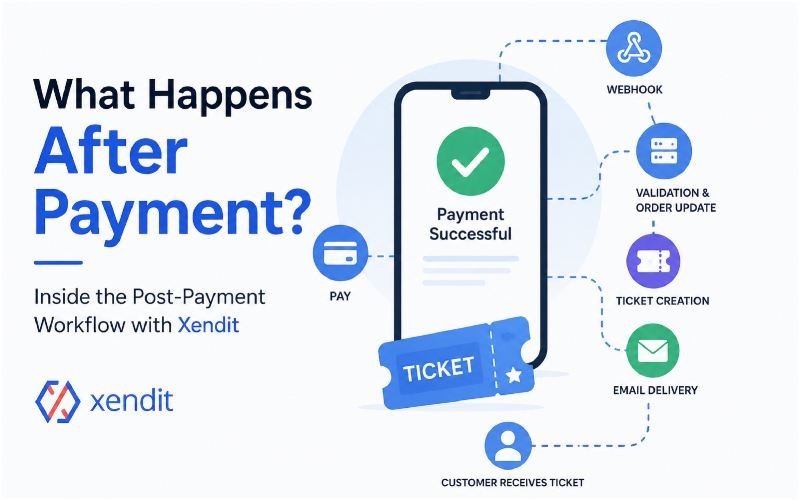
What actually happens after the payment?
From the customer’s perspective, the journey looks simple:
Pay → Success → Ticket
Behind the scenes, however, an event payment can involve payment events, webhooks, validation, order updates, ticket creation, email delivery, customer access, and logging.
This guide looks at that post-payment workflow from two perspectives: what we actually observed during our experience, and what Xendit officially documents about webhook-based payment processing.
Who This Guide Is For
I wrote this for people who deal with event payments from different sides of the process:
- Event organizers using Xendit
- Developers building event checkout systems
- Teams working with WooCommerce and payment integrations
- People responsible for ticket delivery
- Support teams handling payment problems
You do not need to be a developer to follow the main ideas. I will explain the technical parts in plain English and clearly separate our observations from Xendit’s documented behavior.
Before You Test the Payment Flow
Before testing a post-payment workflow, you need more than a working checkout page.
At minimum, the setup should include:
- A Xendit account and payment integration
- An event or order management system
- A configured webhook endpoint
- A method for creating or releasing tickets
- An email delivery system
- A way to track payment and order status
The exact setup depends on the event platform. A WooCommerce installation, for example, can have a different ticket workflow from a custom event application.
That matters because Xendit handles payment-related events, but your own application controls what happens to the order, ticket, email, and customer access.
What We Actually Observed
The first incident started with a normal customer experience. My colleague completed the payment and saw a successful payment message. From the customer’s side, the transaction looked finished.
The ticket did not arrive immediately. He refreshed the inbox, checked the usual folders, and kept the successful payment screen as proof. He did not immediately submit another payment because he did not want to risk paying twice. The ticket email arrived roughly 15 minutes later.
That is what we actually observed.
There is an important limitation, though. We did not capture the complete webhook payload, server logs, queue metrics, or email-provider logs from that particular incident.
So I cannot honestly say that a webhook caused the 15-minute delay.
The delay showed us that something can go wrong after the customer sees a successful payment, but the available evidence does not identify the exact component responsible. That distinction matters throughout this article.
What Xendit Documents
Xendit documents webhooks as a way for its systems to notify merchant applications about payment-related events. Its current documentation also covers duplicate webhook delivery, webhook authentication, retries, server-side processing, and asynchronous handling.
Xendit recommends authenticating webhook requests using the x-callback-token header and handling webhooks on the server rather than relying on client-side logic. It also advises returning a successful 2xx response quickly instead of performing complex processing synchronously inside the webhook request. Xendit’s official webhook handling documentation That explains why the post-payment workflow deserves as much attention as the checkout page.
What Happens After Xendit Sends the Webhook?
The customer sees one payment screen. Behind that screen, the application may need to perform several separate tasks.
I did not capture every server-side step from our colleague’s incident, so the following describes a recommended workflow based on Xendit’s documented webhook model, not a claim that we observed every step in production.
Phase 1: Server-Side Validation
Xendit Records the Payment Event
The customer completes the payment, and Xendit records the resulting payment state. Depending on the payment product and integration, Xendit provides webhook events for payment status changes. For example, its Payment API documentation includes events such as payment.capture and payment.failure.
The important point is that the browser is not the only source of information. The merchant application needs a reliable server-side way to receive payment-status information.
The Webhook Reaches the Merchant Endpoint
Xendit sends the relevant event to the webhook endpoint configured by the merchant. This is the connection between the payment provider and the event system.
The endpoint should be prepared to receive the event even if the customer closes the browser immediately after completing payment.
The Endpoint Validates the Request
The application should not blindly trust every incoming request. Xendit documents webhook authentication through the x-callback-token header and recommends verifying the token before acting on webhook data. Its integration-security guidance also recommends validating important information such as amounts, statuses, and request or webhook identifiers.
The Application Identifies the Payment
Next, the application needs to determine which order the event belongs to. Payment identifiers and order or reference identifiers help establish that connection. The application should know exactly which customer order it needs to update before changing the payment or ticket status.
Phase 2: Database & Ticketing Execution
The Application Checks for Duplicate Processing
This is one of the safeguards I would not skip.
Xendit explicitly documents that duplicate webhook events can occur. For example, a webhook may be retried if the previous acknowledgement was not received. Xendit recommends using server-side identifiers such as payment_id and capture_id to recognize unique events and prevent duplicated processing.
That is where idempotency becomes important.
The Order Status Changes
After the application validates the event and confirms the relevant payment state, it can update the corresponding order.
For example:
Pending → Paid
The exact status names depend on the event platform.
The important idea is that the backend should base the order update on a verified server-side payment event rather than simply trusting a browser success page. Xendit explicitly warns against using frontend redirects as proof that a payment has been successfully processed.
The Ticket Gets Created or Released
Once the order reaches the correct paid state, the ticketing system can create or release the attendee ticket. Depending on the platform, this could involve:
- A ticket number
- A QR code
- A PDF
- A secure ticket page
- An attendee record
There is no single universal ticket-generation method, so I would not claim that Xendit itself creates the event ticket. The payment provider confirms payment-related events; the event platform decides how that payment translates into an attendee ticket.
Phase 3: Customer Delivery & Logs
The Email Enters the Delivery Process
The application can then send the ticket confirmation. For a simple setup, the application might send the email immediately. A larger system may put the email task into a background queue.
Separating email or document-generation work from the webhook request can help prevent slow downstream operations from delaying the webhook response. Xendit specifically recommends acknowledging webhook requests quickly with a 2xx response and discusses using a messaging queue as a buffer when events cannot be processed immediately.
The Customer Gets Access
The customer should now have a clear way to access the ticket. Email is one option, but I would not make email the only option. A secure ticket page or another authenticated access method gives the customer a backup if the email takes longer than expected. That would turn our colleague’s 15-minute email delay from a major concern into a minor inconvenience.
The Event Gets Logged
The workflow should not disappear after the ticket reaches the customer. The system should retain enough information to investigate problems later. A useful chain looks like this:
Order ID → Payment ID → Webhook Event → Order Status → Ticket → Email
When someone contacts support and says, “I paid but never received my ticket,” that chain gives the team something concrete to investigate.
The Complete Flow at a Glance
The entire post-payment process can be simplified to:
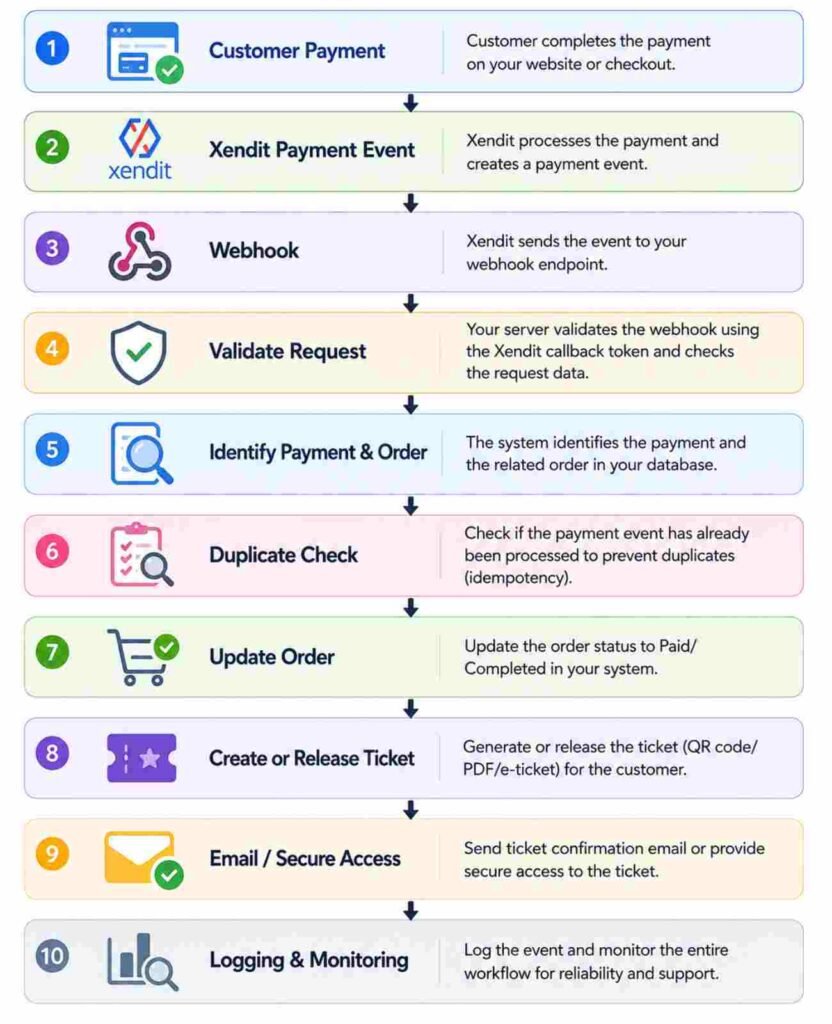
This is the workflow I would expect from a properly designed integration based on Xendit’s documented webhook behavior. It is not a claim that we captured every one of these steps during our colleague’s incident.
Idempotency Explained With a Ticket Example
The word idempotency sounds complicated until you put it into a ticket purchase. Imagine a customer makes payment number 123.
Without Protection
Payment #123 → Ticket created
Then the same payment event arrives again:
Payment #123 → Second ticket created
Now the system has two tickets associated with one payment.
With Idempotency
The first event arrives:
Payment #123 → Ticket created
The same event arrives again:
Payment #123 → Existing payment detected → No second ticket created
The system does not simply ask:
“Did I receive a payment notification?”
It asks:
“Have I already processed this payment?”
That is the practical value of idempotent processing. Xendit documents duplicate webhook scenarios and recommends using unique server-side identifiers to prevent repeated processing.
What “Pending” Actually Means
The second incident was more worrying from a customer-experience perspective. Another colleague saw “Payment Pending” after trying to purchase a ticket. From the customer’s perspective, the immediate question was:
“Did my payment fail?”
That uncertainty can lead to another problem. The customer might open another tab, return to checkout, or submit another payment.
Xendit Payment Status vs Event Order Status
This distinction is important. The payment provider’s status describes what is happening with the payment transaction.
The event platform’s order status describes what the event system currently believes about that customer’s order. Those two systems communicate, but they are not necessarily the same database or the same status field.
For example, an event platform might still show an order as pending while it waits for the appropriate payment event to be received and processed.
That is why developers should define a clear mapping between payment events and internal order states instead of assuming that every customer-facing status has the same meaning. I would also avoid telling a customer to pay again simply because an order page still says pending. The system should first establish what happened to the original transaction.
What Happens If the Customer Closes the Browser?
This is a simple test that reveals a lot about the architecture. Imagine the customer completes payment and immediately closes the browser. If the backend depends on the customer reaching a success page before it processes the order, the workflow has a weakness.
Xendit’s security guidance explicitly says frontend redirects should not be used as the indication that payment has successfully been processed. The server should receive and process the appropriate webhook independently.
That means:
Browser closed ≠ payment processing stopped
This is one reason server-side payment events matter.
What Happens If the Ticket Email Is Delayed?
This is where our colleague’s experience becomes useful. The customer had already completed the payment. The problem was that the expected ticket email did not arrive immediately. A good system should have a recovery path.
That could include:
- A secure ticket-access page
- A ticket available on the success page
- A controlled resend option
- A support lookup using the order or payment reference
The goal is simple: An email delay should not make a confirmed ticket disappear.
The Refund Workflow
The refund problem gave us another part of the post-payment process to think about. One of our colleagues had to check a refund manually. That is our actual observation. We did not run a controlled refund test that proves a particular Xendit refund event failed or arrived late.
Xendit does, however, document refund webhook events such as refund.succeeded and refund.failed. Its current refund documentation explains that the webhook communicates the refund request’s status with Xendit and its payment partners.
Xendit’s official refund webhook documentation
A Typical Refund Flow
Refund requested → Xendit processes refund → Refund event/webhook → Internal order updated → Ticket access reviewed → Customer notified
The important part is the middle. The event system should not treat a refund as complete merely because someone requested one. It should process the relevant refund state and update the internal record accordingly.
There is also an important distinction: a successful refund webhook does not necessarily mean the refunded funds have already appeared in the customer’s account. Xendit notes that final reflection of the funds can depend on the payment channel or financial institution.
What Happens to the Ticket After a Refund?
This is an application-level question that event organizers need to answer before launch. A payment provider can communicate that a refund has succeeded. But the event platform still needs a rule for the ticket. For example, if your business policy says a refunded ticket becomes invalid, the application should implement a flow such as:
Refund confirmed → Ticket marked cancelled → Ticket access disabled → QR/ticket validation rejects the ticket
That behavior should not be assumed automatically. The exact ticket cancellation process depends on the event platform. A successful refund and ticket invalidation are related events, but they are not necessarily the same operation.
What We Observed vs What Xendit Documents
I want to keep this distinction clear because it is easy to blur personal experience with technical documentation.
What We Observed
We observed:
- A colleague completed a payment successfully
- The expected ticket email did not arrive immediately
- The email arrived roughly 15 minutes later
- Another colleague saw a pending payment state
- A colleague had to check a refund manually
What We Did Not Confirm
We did not capture enough evidence to claim:
- The 15-minute delay came from a webhook
- A specific webhook failed
- A duplicate webhook actually occurred during our incident
- A particular email provider caused the delay
- A refund webhook failed
- A specific queue caused the delay
What Xendit Documents
Xendit documents:
- Webhook notifications
- Duplicate webhook delivery
- Webhook authentication
- Server-side webhook handling
- 2xx acknowledgement and retries
- Queue-based buffering
- Refund webhook events
Those documents give us the technical context for understanding how these incidents can be handled, but they do not prove what happened inside our specific incident. I think that distinction makes the article more useful, not less.
Security Checks Before Launch
Payment systems need more than a working checkout button. Before launching an event payment flow, I would check the following.
Use HTTPS
The webhook endpoint should use secure HTTPS communication.
Validate Webhook Authenticity
The application should verify incoming webhook requests according to the payment provider’s documented authentication process. For Xendit webhooks, this includes checking the x-callback-token value. The token should be kept secret.
Validate the Payment Data
Do not validate only the sender. Xendit’s security guidance also recommends checking relevant values such as the request amount, webhook amount, status, and request or webhook identifiers before provisioning a product or service.
Do Not Trust the Browser Alone
A customer seeing “Payment Successful” in the browser should not be the only condition for issuing a ticket. The backend should process the appropriate server-side payment event.
Protect Ticket Access
If tickets are available through a URL, the URL should not expose unnecessary personal or payment information. Use appropriate access controls for ticket pages and downloadable files.
Handle Refunded Tickets
If a refund makes the ticket invalid under your business rules, the ticket validation system should recognize that change.
Log Important Events
Keep enough information to trace important events without storing unnecessary sensitive data. A support agent should be able to investigate an order without guessing what happened.
What I Would Test Before Launch
After seeing these incidents, I would never consider one successful payment test enough. I would test the normal flow and the uncomfortable cases.
| Test | What We Want to See | Problem We Want to Catch |
|---|---|---|
| Successful payment | Order becomes confirmed | Order stays pending |
| Delayed webhook | Payment eventually processes | Customer gets stuck |
| Duplicate webhook | Existing payment stays unchanged | Duplicate ticket |
| Pending payment | Customer gets clear instructions | Customer pays twice |
| Failed payment | Order stays unpaid | Ticket issued incorrectly |
| Closed browser | Backend still processes payment | Workflow depends on browser |
| Missing email | Customer has another ticket-access path | Support request |
| Successful refund | Internal record updates | Manual checking |
| Refund after ticket issue | Ticket follows the refund rule | Refunded ticket remains usable |
I would also record timestamps during controlled testing.
That gives the team something better than a screenshot. You can compare when the payment event occurred, when the application processed it, when the ticket became available, and when the email entered the delivery process. That is how you start identifying where a real delay occurred.
Monitoring After Launch
Testing gives you confidence. Monitoring tells you what actually happens once real customers start using the system. These are the signals I would watch:
- Payments that remain pending for an unusual period
- Webhook delivery problems
- Repeated webhook events
- Successful payments without tickets
- Duplicate tickets
- Refunds waiting for a final state
- Email delivery failures
- Multiple payment attempts for one order
- Support requests about missing tickets
- Refunded tickets that remain active
Xendit’s webhook tools allow teams to inspect delivery attempts and response status, and its documentation describes automatic retries plus manual resend options through the Dashboard.
The goal is not to watch every transaction manually. The goal is to make unusual transactions visible enough that the team can investigate them quickly.
The Part Customers Never See
This is what changed my view of event payments. A customer sees:
Pay → Success → Ticket
The backend may actually deal with:
Payment event → Webhook → Validation → Payment lookup → Duplicate check → Order update → Ticket creation → Email delivery → Customer access → Logging
And refunds add another path:
Refund request → Refund processing → Refund event → Order update → Ticket review → Customer notification
That is why a payment system can appear simple while the workflow behind it is not.
My Biggest Takeaway
When I started looking into the post-payment workflow behind an event payment integration, I expected to find another explanation of how payment processing works.
The incidents changed my focus. The payment itself was not always the difficult part. The difficult part was everything that happened afterward. One colleague waited for a ticket email. Another saw a pending state and faced the temptation to pay again. A refund later showed us why post-payment status matters too.
Those are not technical questions from the customer’s point of view. They are simple questions:
“I paid. Where is my ticket?”
“Why does it say pending?”
“Should I pay again?”
“Is my refunded ticket still valid?”
Those are the questions I would use to judge the quality of an event payment workflow. If the system can answer them clearly and recover from unexpected events without forcing the customer to contact support, the payment experience is doing its job. The interesting work does not stop when the payment succeeds.
It starts there.
Frequently Asked Questions
How do I prevent duplicate event tickets?
Use server-side duplicate detection when processing payment events. The application should identify whether the relevant payment or event has already been processed before creating another ticket.
Xendit specifically documents duplicate webhook delivery and recommends using server-side payment identifiers to help recognize unique events.
What happens if the Xendit webhook is delayed?
The order may remain in its previous state until the appropriate payment event reaches and gets processed by the merchant application.
Xendit documents automatic retries when a webhook does not receive a 2xx response, with exponential backoff.
The system should handle delayed delivery without requiring the customer to submit another payment.
What happens if the customer closes the browser after payment?
A properly designed server-side payment workflow can continue processing the payment event even after the customer closes the checkout page.
The backend should not depend entirely on the browser’s success page. Xendit explicitly advises against using frontend redirects as proof of successful payment processing.
What happens if the ticket email is delayed?
The customer should have another secure way to access a confirmed ticket, such as a ticket page or controlled resend process.
Email should not be the only recovery mechanism.
Final Thought
A successful checkout screen is only one moment in the payment journey.
For an event business, the real workflow continues through payment confirmation, webhook handling, order updates, ticket delivery, customer access, refunds, and monitoring.
The strongest integrations are not simply the ones that make payment possible.
They are the ones that make the entire post-payment experience predictable, recoverable, and secure.