Someone organizing one event, a reunion, a single workshop, or a one-off community meetup, does not need the same platform as someone running monthly ticketed shows. Yet most comparison guides treat every organizer the same way.
If you only need a website for ticket sale gamificationsummit style events once, the priorities are different from what a recurring organizer needs. To see what this actually looks like, I set up a real test event on Ticketbud rather than relying on marketing pages alone.
What Actually Matters for a One-Time Event
- No monthly subscription, since you will not be using the platform long enough to justify a recurring cost
- No long-term contract, so you are not locked into anything after your single event ends
- A fast setup process, since you likely do not want to spend hours learning a full-featured system for one use
- Pay only when you actually sell a ticket, rather than paying upfront regardless of turnout
What Matters Less Here
Advanced marketing automation, CRM-style attendee management, and multi-event dashboards are genuinely useful for someone running events every month. For a single event, these features mostly go unused and are not worth paying extra for or spending time learning.
A Real Test on Ticketbud
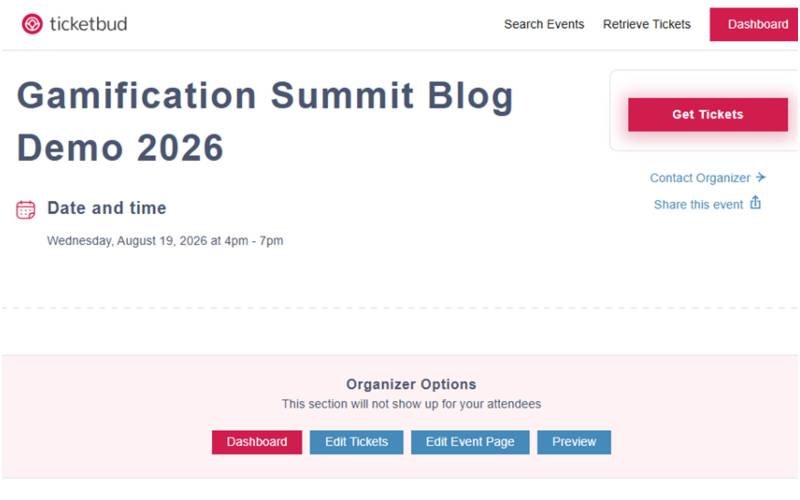
Ticketbud advertises no monthly or setup fees on its own pricing page, with a small per-ticket fee applied only when a paid ticket sells. To see what that looks like in practice, I created a real test event, Gamification Summit Blog Demo 2026, with a $25.00 ticket.
Signing up was not entirely frictionless. The site ran a Cloudflare bot-verification check during signup, which added a short delay before reaching the dashboard. This is a minor point, but worth knowing if you are used to instant account creation on other platforms.
Once past that step, creating the event itself was straightforward: event name, date, and a single $25.00 ticket type.
The Real Fee Breakdown
This is the part most comparison articles estimate instead of check. Ticketbud’s own Ticket Editor showed the fee breakdown directly, calculated automatically once the $25.00 price was entered:
| Item | Amount |
| Ticket price | $25.00 |
| Fees (shown by Ticketbud) | $2.22 |
| Total buyer sees at checkout | $27.22 |
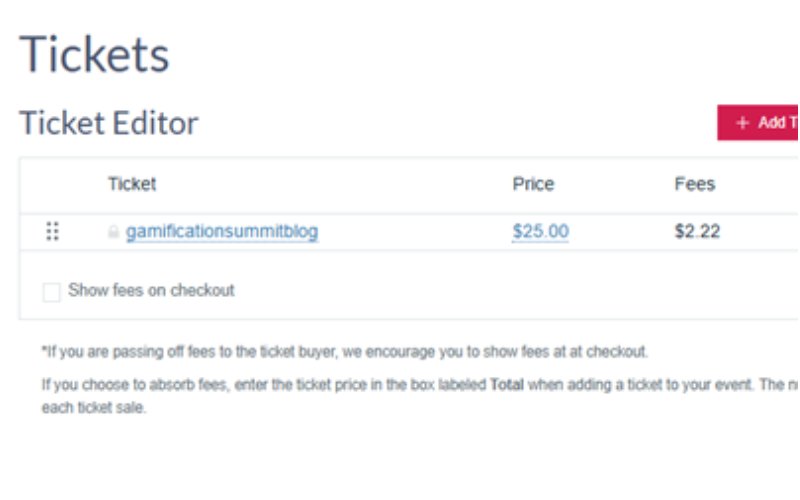
The editor also makes an organizer-absorbed option available: instead of passing the $2.22 to the buyer, an organizer can enter the ticket price in the Total field, and Ticketbud calculates backward so the organizer receives the full intended amount. That flexibility, shown directly in the tool rather than buried in a help article, is a genuinely useful detail for a one-time organizer trying to decide who eats the fee.
Setup Time, Honestly
I did not track this down to the exact second, but the full process, from account creation through a published event page with a working ticket price, took roughly a few minutes, not counting the brief Cloudflare check. For a one-time event, that is a reasonable amount of time to spend once and be done.
A Simple Way to Decide
Ask a single question: will you use this platform again within the next few months? If the honest answer is no, a no-subscription, pay-per-sale platform almost always makes more financial sense, even if a subscription platform looks more feature-rich on paper.
If you want a fuller framework for evaluating any ticket-selling website, including options built for recurring use, the platform evaluation checklist on this blog covers that in more depth. For a full side-by-side comparison of specific platforms, see the main platform comparison guide.
Frequently Asked Questions
Is a free ticketing platform actually free for a one-time event?
On Ticketbud specifically, a free event costs nothing. Once a ticket has a price, a small fee applies, which can be passed to the buyer or absorbed by the organizer, as shown directly in the ticket setup screen during this test.
Should a one-time event organizer ever choose a subscription platform?
Only if the subscription unlocks a specific feature you genuinely need, such as advanced seating charts or a particular integration. Otherwise, the subscription cost rarely makes sense for a single event.
Was the signup process completely smooth?
Mostly, with one exception: a Cloudflare bot-check added a short delay during signup. It was not a major obstacle, but it was not instant either.
Final Thoughts
Choosing a website for ticket sale gamificationsummit style one-off events does not require the same decision process as picking a platform for a recurring series. Skip the subscription, confirm there is no contract, and check that the fee only applies when a ticket actually sells. On Ticketbud specifically, that fee was shown clearly in the ticket editor before a single buyer ever reached checkout.
Have a specific one-time event you are planning and want a second opinion on platform choice? Get in touch, and every message is read personally.
Disclaimer
This article reflects one real test on one platform configuration. Pricing and terms for third-party platforms change over time and can vary by region. Always confirm current fees directly on the platform’s own site before committing to a purchase.
Editorial Transparency
Last updated: August 18, 2026
Basis for this article: A real test event was created on Ticketbud with an actual $25.00 ticket. The fee breakdown ($2.22 fees, $27.22 total) is taken directly from Ticketbud’s own Ticket Editor screen, not estimated or calculated independently
What this article does not cover: Exact setup time was not measured to the second. Mobile check-in and QR scanning were not tested as part of this pass and are not claimed here. TicketLeap and Ticketor are not covered in this piece; only Ticketbud was directly tested
Corrections: If anything here is inaccurate or out of date, contact us and it will be corrected
Author Bio
Zyan Ellington
Founder of Gamification Summit Blog. I have attended real events like GamiCon ATX and GamiCon48V. I write about ticket-selling platforms, event gamification, and what actually drives ticket sales. Everything I share comes from real research and real attendee experience.
Read my full story on the About Us page →